Installation
QMaxent installs as a regular QGIS plugin. After the plugin itself is in place, a one-time dependency setup downloads the Python libraries Maxent needs into an isolated virtual environment that does not affect your system Python or QGIS itself.
System requirements
- QGIS 3.44 LTR or later
- Operating system: Windows 10/11, macOS 12+, or any modern Linux distribution
- Disk space: ~500 MB free for the Python virtual environment
- Internet access is required only on first run to download the Python dependencies; routine model fitting and projection run fully offline.
Install from the QGIS Plugin Repository
QMaxent is published on the official QGIS Plugin Repository.
- Open QGIS and choose Plugins → Manage and Install Plugins…
- In the All tab, type
qmaxentin the search box. The plugin appears in the result list. - Click Install Plugin.
Once installed, three entry points appear under Plugins → QMaxent:
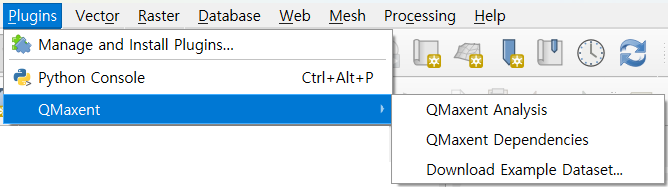
| Menu item | What it does |
|---|---|
| QMaxent Analysis | Opens the main analysis dock — the heart of the plugin |
| QMaxent Dependencies | Opens the dependency-management dialog (next chapter) |
| Download Example Dataset | Bundled SDM datasets for tutorials (see Example datasets) |
Verifying the installation
Choose Plugins → QMaxent → QMaxent Dependencies. If the dialog opens, the plugin is correctly installed. The Environment Status banner will most likely read Dependencies not installed the first time — that is expected and is dealt with in the next chapter.
Updating to a newer version
When a new release ships, the QGIS Plugin Manager will mark QMaxent as upgradable. Click Upgrade Plugin in the Installed tab. Dependencies generally do not need to be reinstalled across patch releases (0.1.x → 0.1.y); QMaxent will alert you in the Dependencies dialog if anything has changed.
Troubleshooting
QMaxent does not appear in the search results
Make sure your QGIS version is 3.44 or later (Help → About QGIS).
On older versions QMaxent is filtered out as incompatible. Also confirm
the Show experimental plugins option in Settings is set to
your preference — QMaxent's stable releases do not require it.
Plugin installs but the menu entry does not appear
Restart QGIS. Some QGIS versions require a restart for top-level menu entries from new plugins to register.
Corporate proxy or restricted network
The plugin install itself uses QGIS's network stack and respects
QGIS's proxy settings. The dependency installer (next chapter)
downloads from PyPI; if your organisation blocks
PyPI, ask your network administrator to allow pypi.org and
files.pythonhosted.org.
Once installed, continue to Dependencies.